
The Penny Dreadful of the RISC OS scene.
Kevsoft RISC OS SoftwareSoftware for RISC OS ComputersCurrency Gets MarkdownMy currency exchange application for RISC OS called Currency has been updated to 2.07 New in this version is support for Markdown which was recently added to the RISC OS open forum, this is available as a save option for the historical exchange rate data and the world bank data. Also a spelling mistake in the … Continue reading "Currency Gets Markdown"Currency Updated Software Thu, 20 Aug 2026 18:55:28 +0000 New Application InfoFileI have released a new application for RISC OS called InfoFile which is version 1.00 What it does is simply if a file, directory or an application is dragged to it’s iconbar icon or the main window then the basic information will be displayed in a task window. I waw inspired to write this application … Continue reading "New Application InfoFile"InfoFile New Software Mon, 06 Jul 2026 17:32:47 +0000 New Quiz Application SemaQuiz For RISC OSI have released a new RISC OS Quiz using my Quiz Engine called SemaQuiz , this will be version 1.00 This quiz is on Semaphore and is a multiple choice Quiz with 10 questions with 4 possible answers. The following languages are supported The Semaphore is from Semaphorify and Scouting Resources. If you find this or other … Continue reading "New Quiz Application SemaQuiz For RISC OS"MemaQuiz Quiz Engine Thu, 14 May 2026 19:40:49 +0000 Release 2 Of Quiz EngineI have released the second release of my multiple choice Quiz Engine for RISC OS. This release makes quizzes wth single language look better with change of language options hiden. For those that have downloaded the previous version it is recommend to download the following files Quiz Engine and the Misc fles. For first time … Continue reading "Release 2 Of Quiz Engine"Quiz Engine Sun, 26 Apr 2026 21:35:41 +0000 New Application MorseQuizI have uploaded a new RISC OS application for testing your knowledge on Morse code called MorseQuiz It displays some Morse Code and gives you four options to pick from and ten questions in all. You just have to pick the right answer. It is built on my Quiz Engine which was released recently, and … Continue reading "New Application MorseQuiz"MorseQuiz Quiz Engine Updated Software Wed, 18 Mar 2026 21:55:01 +0000 Quiz Engine First ReleaseWant to create your own quizzes for RISC OS now you can with the first release of my Quiz Engine as used by FlagQuiz. On the Quiz Engine web page you will find the instructions on what to do as well as a skeleton application called MyQuiz. Hopefully the instructions are clear and easy to … Continue reading "Quiz Engine First Release"Quiz Engine Thu, 26 Feb 2026 23:13:30 +0000 Grokipedia Comes To TrainTimesMy UK train time table application for RISC OS called TrainTimes has been upgraded to version 2.09 New in this version is that Grokipedia an online AI powered encyclopedia has been added to options for getting information about stations. Grokipedia is not the finished article at the moment so some URLS do not work properly. … Continue reading "Grokipedia Comes To TrainTimes"TrainTimes Updated Software Tue, 17 Feb 2026 20:14:08 +0000 FlagQuiz Version 1.02 ReleasedI have made another little update to my RISC OS world flag quiz application FlagQuiz taking it to version 1.02 New in this version is that the question sprites are local to the application itself rather than being placed in the WIMP sprite pool. This should avoid conflicts with other application that use sprites with … Continue reading "FlagQuiz Version 1.02 Released"FlagQuiz Updated Software Tue, 30 Dec 2025 22:17:47 +0000 FlagQuiz Goes To Version 1.01My RISC OS application for testing peoples knowledge on world flags called FlagQuiz has had a little upgrade taking it to version 1.01 One was a bug fix in which it was possible for no correct answers were available to be picked, which has now been fixed with the help of Reporter. The other changes … Continue reading "FlagQuiz Goes To Version 1.01"FlagQuiz Updated Software Thu, 18 Dec 2025 18:35:27 +0000 New App FlagQuizI have released a new RISC OS application called FlagQuiz which is a quiz about flags from around the world. It is multiple choice quiz with 10 questions with each question having 4 choices, you are presented a flag and have to guess the country it belongs to. It supports the RISC OS interactive help, … Continue reading "New App FlagQuiz"FlagQuiz New Software Wed, 19 Nov 2025 23:17:22 +0000 |
The Kevsoft QuizEngineCurrent VersionThe current version of the Kevsoft QuizEngine is 1.03, the misc file is 1.01 and release 2 of the skeleton application.DownloadsYou will only need to download the Skeleton application for the first time using it, the Quiz Engine download will be if and when the quiz engine gets updated that can be downloaded then copied into your working application.How to make your own quiz application.Unzip the MyQuiz/zip and copy it somewhere on your computer. Which should look something like the image below.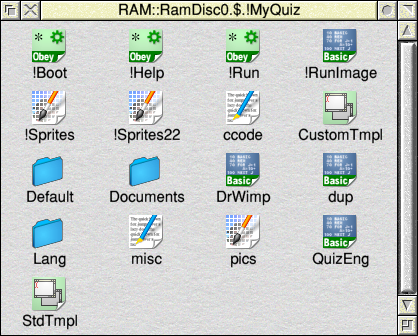
Inside of !MyQuiz Rename !MyQuiz to what you want ot call your quiz keeping the exclamation mark at the beginning, for example change from !MyQuiz to !AcornQuiz Load the following four files into your text editor of choice !Boot, !Help, !Run and !RunImage and do a search and replace with MyQuiz to what you are calling your quiz application. In the image below we will change MyQuiz to AcornQuiz. 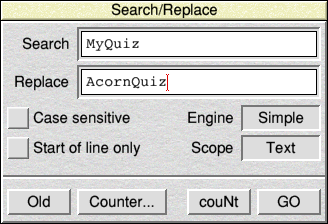
Replacing MyQuiz with AcornQuiz With !Sprites and !Sprites22 delete kevsoft and kevsoftsm and put your own logos in those 2 sprite files. Also delete !myquiz sprite and put your own application sprite in there. The files ccode and pics are related in which your image files live inside pics and ccode is what you call the individual sprite. One name per line on ccode. So for example if you are doing a quiz on computers produced by Acorn, then you had a sprite called bbcb in pics, then on ccode you would have bbcb on one line and another image of an Acorn Electron called elct then the next line on ccode would be elct and so on, until you have every image matched with a line on ccode. You may have some images that are so close to other in looks that it would be unfair to have them come up as options on the same question, that is where the file dup comes in. For example the RISC PC610, 710 and Strong ARM machines look the same from the outside.So if we called them rispc610, rispc710 nnd strongarm we would change the following, from the dup file which you would load into your text editor and see image below 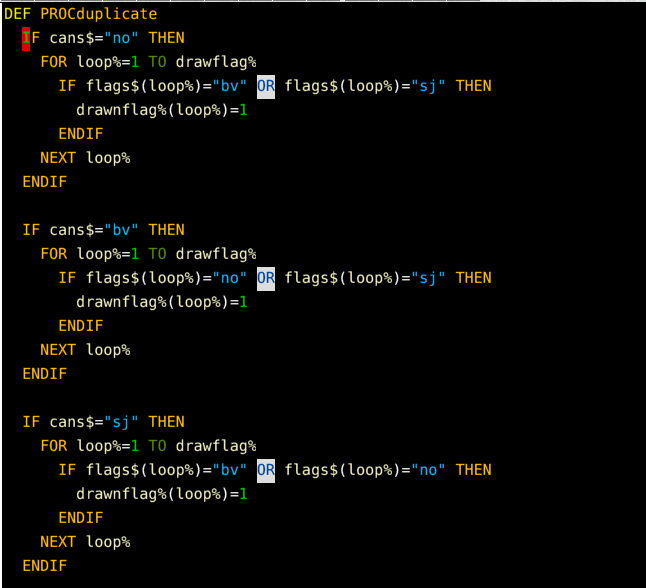
Duplicate what to change Then change it with what is shown on the image below 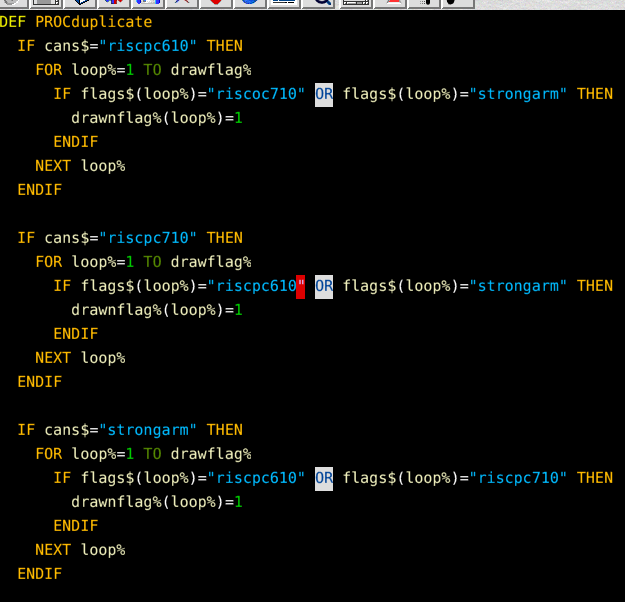
Duplicate what has changed What that does is basically when it finds an answer that has more than one possible answer it will stop those answers being an option. The misc file is where you change certain items about your quiz application, the following do: logo1 is the logo that appears when the opening banner is displayed and that lives in !Sprites and !Sprites22 logo2: is where the name of the smaller logo and is displayed on the main quiz window. web: is the URL of where to get more information about your quiz application can be found. Clicking on the logo2 in the main window will open your browser to there. quest: is the number of question you want the quiz to ask. ibar: is if you want text to appear under it‘s icon on the iconbar with N or for no and Y for yes. translate:If you are not planning on doing multiple languages then change the Y to an N orn which will hide the language icon and set default icon, as well as changing the Change Language menu to the Info menu. version: is the version of your quiz application how you number that is up to you. 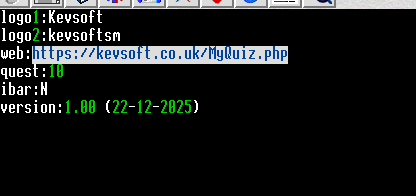
Contents of the misc file The Lang directory contains the language files in sub directories, inside each of those directories are 3 files called Help, message and Name. These 3 files are all message files. The Help file contains the text that appears when some one uses an interactive help application and needs very few changes, which will be changing MyQuiz to what your application is called and .... to what you want to put their. The Message is where the text for the window titles, icons and menus appear and the same changes to be made here. The file called Name which is blank must contain the same case and codes used in ccode with the wording of the answers. For example if you are doing a quiz on Acorn computers you could have: rpc610:RISC PC610 rpc710:RISC PC710 stronarm:Strong ARM RISC PC bbcb:BBC Model B And so on. One point to note is that the last line in a message file is not read by the computer so put a blank line or something that will not be shown. This will need to be repeated for each of the languages you wish to support. Providing IntstructionsInside the Documents directory are various files, The History file is where you document the changes you have made over time, the index/html file is a HTML file containing the instructions on how to use and what your quiz is about, the index/txt is the same but a text file and the license/html file contains any license you wish to impose. The Image directory is where the various image files will go that then will be shown by the HTML files.Before Releasing Your Quiz Application.Before you release your application into the wild you must make sure your application name is unique. To do so you will need to download the Allocate application from RISC OS Open and follow the instruction on that page. Also test it before hand.Good luck in designing and releasing your own quizzes. |
MenuHomeLinks Credits Inter Nationalising MACadd Quiz Engine Using Netsurf with a Netgear DG834G Contact Me Your Info Tutorials Hints and Tips Past Polls Kevsoft Merchandise Daily Sudoku Scrabble Word Checker Site News Kevsoft on Ko-fi Kevosft YouTube Channel Kevsoft on Twitter   

 


|
© Kevsoft 2002 - 2026